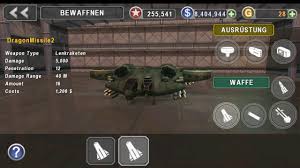
GUNSHIP BATTLE : Helicopter 3D is a great action game that you can download for free at 9game.
For more mobile games information, you can click here.
To find more action games, you can click here.
App Recommend: UC Cleaner: Clean Memory
First you have to download the game I mean Gunship Battle, If already exists than create an apk version for this game, with the help of Apk Extractor. You can download an Apk Extractor from google play store, search for this and download. Now open apk extractor and click on Gunship Battle and you are done.
Now all you need is Lucky Patcher, to download this app you need to search for the apk version of this app, because this app is no longer available at Google Play Store. Search like : Download Lucky Patcher.apk latest version. Size of the lucky patcher is only 4.11 MB.
Now open Lucky Patcher, also I want to mention that this app works fine with non-rooted mobile also. Open Lucky Patcher and find Gunship Battle, click on gunship battle, than click on Open Menu of Patches, now you will find a pop out, click on Create Modified APK file and than click on Apk rebiller for InApp and LVL emulation, than select Support patch for LVL emulation and Support patch for InApp emulation and click on rebuild the App.
Wait for a minute and you will find another pop with a notice that you are successful modify this app, or something like that.
Now close Lucky Patcher and uninstall Gunship Battle. After that go to your file manager, than go for Android > data > com.forpda.lp > files > LuckyPatcher > Modified > GUNSHIP.BATTLE >GUNSHIP.BATTLE. Now one is your modified apk install it. (firstconfirm that you have give the phone permission to install apps frokUnknown Source, if you don't know how to allow this, search forgoogle or contact me via comment).
Now open Gunship Battle, Click on coins + button choose any pack of coin, I recommend you to choose the higher one, than you will find a pop out from Lucky Patcher, click oky and check your golds. You can do this anytime when you need golds.
You are all done.
Extra steps : Method to get all of the golds to the non-modified version I mean official version of this game.
Go to your profile on Gunship Battle, make sure that you are connected to the Internet. Now click on Backup data at the right corner of the screen, and when you it will say that you have successful backed up your data, close the game and uninstall it.
Now, do u remember that at the first I told you to extract the apk version of Gunship Battle, now you have to install that apk.
To find extracted apk go to File manager and look for a folder including word extract or extractor, in many cases the name of the folder is like, Extracted apk, apk extractor, when you will find the apk install it and open it.
Now go to the profile of the Gunship Battle again and click on the restore the game below or up of the backup button, do not off your internet, and you will get a notification like this that your purchase are successfully restored, and now you have a lot of gold on the official version of this game. Spend them where you like to spen.
For more mobile games information, you can click here.
To find more action games, you can click here.
App Recommend: UC Cleaner: Clean Memory


 Download the software using the buttons below.